-
Type:
Bug
-
Resolution: Fixed
-
Priority:
 Low
Low
-
None
-
Affects Version/s: 10.133.1
-
Component/s: Dynamic Reports - Backlog
-
2
-
Severity 3 - Minor
-
No
Issue Summary
The solution layer was disabled. However, in v10.133.1, the solution filter option is available in all work item views (backlogs, grids).
Steps to Reproduce
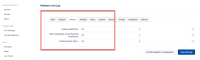
- Step 1. The Solution option is disabled in the Platform.
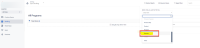
- Step 2. go to Custom room > backlog, and click Apply Filter. The Solution option is available in the filter in v10.133.1.


Expected Results
The Solution filter option should be hidden if Solutions are not enabled on the entire system.
Actual Results
Even though the solution layer is disabled, the "Solution" filter option is still displayed."
Note
In previous versions, the Solution option was not listed when the customer attempted to filter.
Workaround
Currently there is no known workaround for this behavior. A workaround will be added here when available


- is connected to
-
JAWM-6937 Loading...
- is reviewing
-