-
Type:
Bug
-
Resolution: Unresolved
-
Priority:
 Low
Low
-
None
-
Affects Version/s: 10.131.3
-
Component/s: Strategy - Custom Hierarchy
-
2
-
Severity 3 - Minor
-
No
Issue Summary
When the 'Value Delivered'/'Key Result Progress %' exceeds 100%, as this results in you being in the Custom Room with a score of more than 1.
This is reproducible on Data Center: (yes)
Steps to Reproduce
- Step 1. Navigated Custom Room and select Objective updated Key Result
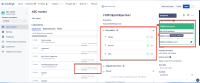
- Step 2. Updated scores in key results.
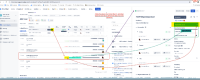
- Step 3. When the 'Value Delivered'/'Key Result Progress %' exceeds 100%, the score value in OKR hub and Objective slideout shows as 1; however, the score in Custom room shows more than 1, and the percentage of value delivered is inconsistent.


Expected Results
Based on article OKRs: the ultimate guide to objectives and key results the scoring scale is from 0 to 1, correct score and % of value delivered vales is shown in custom room, same as OKR hub and Objectives
Scores – A sliding scale between 0 and 1 that indicates whether you missed, came close to, or hit your stated target for the KR.
For example:.3 = you missed the mark by quite a lot
.7 = you didn't hit your target but made great progress
1 = you hit your stretch target
Actual Results
Incorrect score and % of value delivered values are shown in Custom Room.
Workaround
Currently there is no known workaround for this behavior. A workaround will be added here when available


- is connected to
-
JARDA-6386 Loading...