-
Type:
Bug
-
Resolution: Fixed
-
Priority:
 Low
Low
-
Affects Version/s: 10.131.3
-
Component/s: Static Reports - General Reports
-
1
-
Severity 3 - Minor
-
No
Issue Summary
Even the Major theme toggle is disabled, Themes that are set with the major theme are displayed in the Theme Rank Report.
This is reproducible on Data Center: (yes)
Steps to Reproduce
- Step 1. Created a few Themes with Major types
- Step 2. disabled the "Major Theme" field in:Settings > Details Panel Settings > work type = Theme
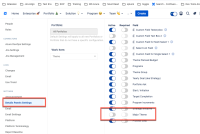
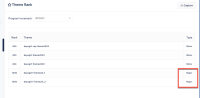
- Step 3. Navigate to Program > programname > Reports > Theme Rank, Maior type of Themes are displayed


Expected Results
When the "Major Theme" Details Panel Settings toggle is disabled, the column called “Type” (which shows Major or Minor as options) should not be visible in the “Theme Rank” report
Actual Results
When the "Major Theme" Details Panel Settings toggle is disabled, the column called “Type” (which shows Major or Minor as options) is still visible in “Theme Rank” report and all Themes are listed as “Minor”. This implies a category on the Theme that it does not have.
Workaround
Currently there is no known workaround for this behavior. A workaround will be added here when available


- is connected to
-
JARDA-4817 Loading...
- is reviewing
-