-
Type:
Bug
-
Resolution: Fixed
-
Priority:
 Low
Low
-
Affects Version/s: 10.129.3
-
Component/s: Static Reports - General Reports
-
1
-
Severity 3 - Minor
-
Yes
-
Disable button with lighter color treatment when navigation doesn't allow the report to be accessed. New tooltip explaining proper nav method. Add to release notes when fix is implemented.
Issue Summary
When the customer accesses the Value Engineering Report by navigating to Portfolio > Epic > Value tab and clicking Analyze under Value Engineering, the data is currently displayed. However, if the same report is accessed via Custom Room or Items > Epic, the Value Engineering report appears to be empty
This is reproducible on Data Center: (yes)
Steps to Reproduce
- Step 1 Navigated Portfolio > portfolio_name
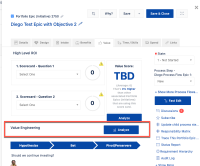
- Step 2 click on an Epic > Value Tab > Value Engineering > Analyze
- Step 3 Confirmed the report is shown correctly
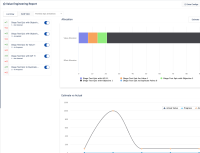
- Step 4 Navigated Custom Room or Item > Epic > Value tab> Value Engineering > Analyze
- Step 5 Confirmed The Value Engineering report is empty incorrectly.
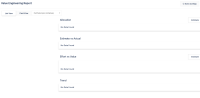


Expected Results
The Value Engineering report is displayed correctly from accessing the Custom Room or Item
Actual Results
A blank report is displayed when the users access Custom Room or Item
Workaround
Currently there is no known workaround for this behavior. A workaround will be added here when available


- is connected to
-
JARDA-4656 Loading...
- relates to
-