-
Type:
Bug
-
Resolution: Fixed
-
Priority:
 Low
Low
-
Affects Version/s: 10.129.3
-
Component/s: Product - New Navigation
-
1
-
Severity 3 - Minor
-
No
Issue Summary
Story point progress by team can be found under Programs and Teams layer;
To navigate to this report:
If you’re using the new navigation:
Select Programs or Teams in the top navigation bar and select the entity you want to view information about.
On the sidebar, select Reports in the list of options.
Select Story point progress by team; the report displays.
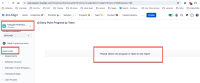
However, this was discovered at the Portfolio> More Page. it's asking for a Program or Team choice, and there's no filter to choose.

Story point progress by team report should not be listed in the Portfolio as it is invalid for this context.
The Estimation Trend report should be moved from the Pages section to the Reports section
This is reproducible on Data Center: (yes)
Steps to Reproduce
- Step 1. Go to Portfolio and select one of the Portfolio
- Step 2. Go to More Page and able to find Story point progress by team report
Expected Results
As Story point progress by team report should navigate to the program or team layer based on documentation, this page shouldn't be listed.
If this needs to be listed under the portfolio layer, the filer option should be added for the Program or Team choice.
The Estimation Trend report should be moved from the Pages section to the Reports section.
Actual Results
Story point progress by team report can be found under Portfolio> More Page. it's asking for a Program or Team choice, and there's no filter to choose.
The Estimation Trend report should be moved from the Pages section to the Reports section.
Workaround
Currently there is no known workaround for this behavior. A workaround will be added here when available

- is connected to
-
JAAND-3563 Loading...
- is reviewing
-