-
Type:
Suggestion
-
Resolution: Unresolved
-
Component/s: Stories - Action
-
1
Issue Summary
Currently, to be able to see the Why button on the Story, you need to have one of the following the 'Additional Options' permissions
- Add Agile Objects
- Manage Agile Objects(Admin)
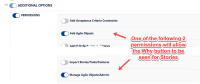

Steps to Reproduce
- Create a new Role or copy an existing one.
- Remove from the Role the additional Options' permissions
- Add Agile Objects
- Manage Agile Objects(Admin)
- Assign the role to a user
- Login to Jira Align with that user
- Go to the feature grid and open a Feature to view the details slideout
- Go to the story grid and open a Story to view the details slideout
Expected Results
The Why button is visible for both the Feature and the Story in their detail panel
Actual Results
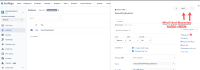
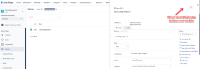
The Why button is only visible for the Feature while the Story does not show the Why button nor does it show the Maximize button
- Feature
- Story


Workaround
Currently, there is no known workaround other than adding one of the following 'Additional Options' permissions
- Add Agile Objects
OR - Manage Agile Objects(Admin)


