-
Type:
Bug
-
Resolution: Won't Do
-
Priority:
 Low
Low
-
None
-
Affects Version/s: 10.125.3
-
Component/s: Product - Navigation
-
None
-
1
-
Severity 3 - Minor
-
No
-
None
Issue Summary
Lean UX/UI design includes the following objects;
• Experience Maps (admin > role > Portfolio > Manage: Experience Maps)

• Lean Use Case (Admin >Role > Portfolio/Program > Manage: Lean Use Case)

• Design Component (admin > role > Program > Manage: Design Component)

Out of these 3, UI/UX controls the addition/edit/delete of items for 2 of them. For example, if the submit toggle is disabled in UI/UX permission, Save button is not displayed on these objects.
• Experience Maps
• Design Component
However, Lean Use case has its own Add/ Delete/ Submit / Add Descriptions permissions.
This is reproducible on Data Center: (yes)
Steps to Reproduce
- Step 1. Trun off the toggle on UX/UI permission
- Step 2. Go to program > More Items > Lean Use cases
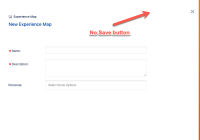
- Step 3. Click the Created Experience Map button on the top right, Save button is missing.
Expected Results
It should either be, all items in their respective areas should have the same add/save/etc.. function, or all should relate to UI/UX. Such as:

- Option 1
UX / UI Experience Maps Add Delete Submit Add Description Lean Use Case Add Delete Submit Add Description Design Components Add Delete Submit Add Description
- Option 2
UX / UI Add Delete Submit Add Description Experience Maps Lean Use Case Design Components
Actual Results
When UI/UX permission is modified, it affects on Experience maps and Design Component
Workaround
Modified UX/UI permission.


- is related to
-
ALIGNSP-21529 Loading...