-
Type:
Bug
-
Resolution: Fixed
-
Priority:
 Low
Low
-
Affects Version/s: 10.123.1
-
Component/s: Product - New Navigation
-
1
-
Severity 3 - Minor
-
No
-
None
Issue Summary
New Navigation: Missing Nav terminology option for Strategy
Steps to Reproduce
- With New Navigation enabled
- Go to Settings > Platform Terminology
- Scroll down to the "Navigation Menu" section
- Notice we are still showing Enterprise label instead of Strategy
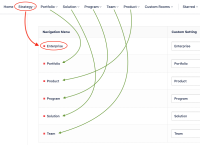

Expected Results
Platform Terminology provides option to customize the Strategy navigation menu label
Actual Results
Platform Terminology does not provide an option to customize Strategy nav menu label... instead, it shows the older Enterprise label
Workaround
Currently there is no known workaround for this behavior. A workaround will be added here when available

- resolves
-
ALIGNSP-20356 Loading...
-