-
Type:
Suggestion
-
Resolution: Unresolved
-
Component/s: Capabilities
-
1
Issue Summary
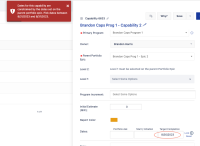
When an Epic has only a Start date or only a Completion date populated, it constrains child Capabilities to that single date for its Start and Completion. Trying to go outside of that date produces error:
Dates for this capability are constrained by the dates set on the parent portfolio epic. Pick dates between 08/31/2023 and 08/31/2023.
Steps to Reproduce
- Create Portfolio Epic with Target Completion date only. Save.
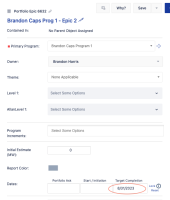
- Create child Capability with Target Completion date that falls before Epic's date. Save and observe error:


Expected Results
Capability dates should be constrained to on or after the parent Epic's Start date and on or before the parent Epic's Completion date. (This is the behavior seen with Capabilities and child Features.)
Actual Results
Capability's Start and Completion dates are constrained to only the single day defined in parent Epic's Start or Completion date.
Workaround
- Define both a Start and Completion date for the Epic
- Or leave both Start and Completion dates empty


- is connected to
-
JALPM-2937 Loading...
- resolves
-