-
Type:
Suggestion
-
Resolution: Unresolved
-
Component/s: Obstacles - Dependencies
-
4
Issue Summary
Where a PROGRAM has a Dependency on a TEAM:
- On the TO DO screen, Dependencies show as COMMITTED, but DO NOT show a committed date, even when committed to a sprint
- On the ALL screen, Dependencies DO NOT show COMMITTED or DATE
Where a TEAM has a Dependency on a TEAM:
- on the TO DO Screen, Dependencies show as COMMITTED and show a DATE
This is reproducible on Data Center: (yes)
Steps to Reproduce
- Step 1. Created PI and assigned multiple programs in Programs, Products and regions tab
- Step 2. Created Dependency with associated with Program in Requesting from and associated with Agile Team in Depends on field
- Step 3. Created another Dependency with associated with Team in Requesting from and associated with Agile Team in Depends on field
- Step 4. Both Dependencies are set as Committed and compare All and TO DO view
All View To Do View 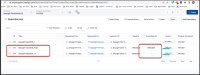
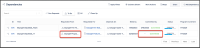
On the ALL screen, Dependencies DO NOT show COMMITTED or DATE


Expected Results
On the ALL screen, Dependencies do show COMMITTED or DATE
Actual Results
On the ALL screen, Dependencies DO NOT show COMMITTED or DATE
Workaround
Currently there is no known workaround for this behavior. A workaround will be added here when available


- is connected to
-
JALPM-2812 Loading...
- is related to
-
- mentioned in
-
- relates to
-
-
- resolves
-