-
Type:
Bug
-
Resolution: Fixed
-
Priority:
 Medium
-
Affects Version/s: 10.115.3
-
Component/s: Jira Connector - State Mapping
-
2
-
Severity 3 - Minor
-
No
-
None
Issue Summary
Features terminology changed in Platform Terminology is not reflected in Risks Relationship filter and Jira Settings >> State Mapping
Steps to Reproduce
Scenario 1: Risks Relationship filter
- Go to Administration >> Settings >> Platform Terminology
- Change the Features name for both "Object Singular" and "Object Plural"
- Click on "Update Terminology"
- Now go to Program >> Risks
- Click on "Apply Filters"
- Select "Relationship" from "Select what you want to filter by:" dropdown
- Check the Relationship dropdown now, we can still see the old Features terminology.

Scenario 2: State Mapping
- Go to Administration >> Settings >> Platform Terminology
- Change the Features name for both "Object Singular" and "Object Plural"
- Click on "Update Terminology"
- Now go to Administration >> Jira Settings >> State Mapping
- Expand Type dropdown, we still see the old Features terminology.
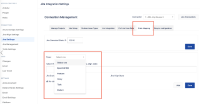

Expected Results
Relationship dropdown and Jira Settings >> State Mapping >> Type dropdown should have new Features terminology.
Actual Results
We still see old Terminology for Features, it is not getting updated with the new names.
Workaround
Currently there is no known workaround for this behavior. A workaround will be added here when available


- resolves
-
ALIGNSP-28915 Loading...