-
Type:
Bug
-
Resolution: Won't Fix
-
Priority:
 Medium
-
None
-
Affects Version/s: 10.105.0, 10.104.3, 10.106.2, 10.116.3
-
Component/s: Planning|Exploring - Other
-
5
-
Severity 2 - Major
-
No
Issue Summary
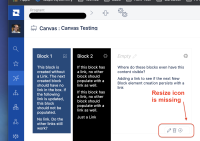
- Unable to resize blocks at the Canvas (PortfolioCanvas.asp) page as the resize icon is not displayed
Steps to Reproduce
- As a Super Admin, browse to the Canvas page
- On the lefthand side blue menu, click ENTERPRISE >> Canvas (Labs)
- Open an existing canvas
- Hover until the edit menu displays in the bottom-right corner
- Notice the resize icon is missing

Expected Results
- Ability to resize a block, accordingly to product functionality as per Help Center article 10X: Build and Customize Strategic Canvases (Jira Align Labs):
Add and edit blocks
(...)
To resize the shape of a block, hover until the edit menu displays in the bottom-right corner. Hold down and drag the Resize icon to change the width and height:


Actual Results
- The resize icon is missing
Workaround
- Currently, there is no known workaround for this behavior. A workaround will be added here when available.


- is connected to
-
JALPM-1780 Loading...
- resolves
-
-
-
-
(2 resolves)