-
Type:
Bug
-
Resolution: Fixed
-
Priority:
 Low
Low
-
Affects Version/s: 10.102.1
-
Component/s: Ideation - Customer Portal
-
1
-
Severity 3 - Minor
-
No
Issue Summary
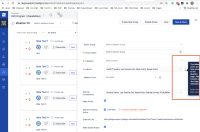
When added the user doesn’t have the ideation permission in the Admins field, the message is generated, however, the message is cut-off on the right-hand side and cannot be read it.
The same issue is reproduced on the different browsers – Chrome, Safari, Firefox.
Steps to Reproduce
- Step 1. Tested with scrum master, removed the Ideation permission:
Disabled Ideation toggle
1. Enterprise – Manage Ideation > disable Manage Group
7. Products - Ideation - Step 2. Go To Ideation > Setup > Admins Fields - add the user who doesn't have Ideation permission
- Step 3. Able to generate the message and reproduce the issue -the message is cut off:

Expected Results
The full message is displayed.
Actual Results
The message is cutoff and couldn't read it.
Workaround
Currently there is no known workaround for this behavior. A workaround will be added here when available

- is connected to
-
JALPM-1524 Loading...
- mentioned in
-
-
-
-
-
-
-
-
-
-
-
-
-
-
-
-
-
-
-
-
-
-
-
-
-
-
-
-
-
-
-
-
-
-
-
-
-
-
-
-
-
-
-
-
-
-