-
Type:
Bug
-
Resolution: Fixed
-
Priority:
 Medium
-
Affects Version/s: 10.100.3
-
Component/s: Dynamic Reports - Work Tree
-
1
-
Severity 3 - Minor
-
No
-
None
Issue Summary
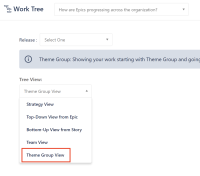
Custom terminology is not being used in the Tree View dropdown.
Steps to Reproduce
- Change the Theme Group terminology (in this case, changed to Business Case)

- In the Work Tree page, click in the Tree View dropdown


Expected Results
Display the custom terminology as an option.
Actual Results
The default terminology is being displayed
Workaround
Currently, there is no known workaround for this behavior. A workaround will be added here when available


- relates to
-
-

- Closed
-
- mentioned in
-
Page Loading...
- resolves
-