-
Type:
Bug
-
Resolution: Fixed
-
Priority:
 Low
Low
-
Affects Version/s: None
-
Component/s: multiple - backlog
-
None
-
1
-
Severity 3 - Minor
-
No
Issue Summary
Empty process steps are not considered when filtering "doesn't contain" process step.
Steps to Reproduce
- Create a developmental process step for Epics.
- Enable Process Steps for that Epic.
- Create several Epics under that prorgram
- Navigate to Epic Backlog.
- Make sure some epics does not have any process steps indicated.
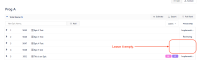
- Set a "doesn't contain" process step filter.
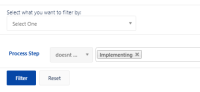
- Check the results


Expected Results
It should also return Epics with empty process steps.
Actual Results
Only considers Epics with process steps values.

Workaround
Make sure not to leave any process steps empty so that they will not be missed out when filtered.


- causes
-
ALIGNSP-7827 Loading...
- is connected to
-