-
Type:
Bug
-
Resolution: Fixed
-
Priority:
 High
High
-
Affects Version/s: 10.79
-
Component/s: Jira Connector, team - stories
-
None
-
17
-
Severity 2 - Major
-
Rockets - Usher 8
-
None
Issue Summary
An error message is displayed indicating that the user needs to select a Jira Project even though there is already one assigned.
Steps to Reproduce
- Set "Make selection of Jira projects mandatory when creating items" to Yes in Administration > Jira Settings > Jira Setup
- Open a Story that is synced already to Jira.
- Update the description.
Expected Results
- User should be able to update the story without any error.
Actual Results
The story update is successful and synced to Jira. However, an error message is displayed indicating that there is no Jira Project confusing the users.

Workaround
Please update the following configuration for the workaround
- Set "Make selection of Jira projects mandatory when creating items" to No in Administration > Jira Settings > Jira Setup
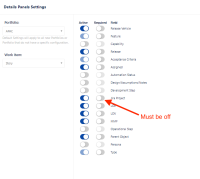
- Jira Project must not be required in Details Panels Settings > Portfolio > Story


- depends on
-
JADOD-68 Loading...
- mentioned in
-
-
-
-
-
-
-
-
-
-
-
-
-
-
-
- resolves
-
-
-
-
-
-
-
-
-
-
-
-
-