-
Type:
Bug
-
Resolution: Fixed
-
Priority:
 Medium
-
Affects Version/s: 10.72
-
Component/s: multiple - kanban boards
-
None
-
1
-
Severity 3 - Minor
-
Stubborn Dragons - TART2
-
No
Issue Summary
When adding more than 6 task in a kanban card, there is no scroll option on the page to view the tasks created.
Steps to Reproduce
- Create a kanban board and add an Epic card
- In your Epic card, navigate to Card More Fields.
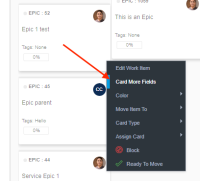
- Kanban Card will open and select Task tab
- Add more than 10 Tasks and observe

Expected Results
A page scroll should appear so users can view the tasks created.
Actual Results
No page scroll appears. Users can't view all tasks.

Workaround
Currently there is no known workaround for this behavior. A workaround will be added here when available

