-
Type:
Bug
-
Resolution: Unresolved
-
Priority:
 Low
Low
-
None
-
Affects Version/s: None
-
Component/s: Forms Builder, Proforma DoS
-
2
-
Severity 3 - Minor
Issue Summary
Pre-filled (default) value present in the Form linked to a Jira custom field is not updated upon Form Submission.
This is reproducible on Data Center: Yes
Steps to Reproduce
- Create a Form with any simple fields.
- Link one of the fields in Form to a Jira Custom field. Fill the DEFAULT ANSWER section in Form configuration so that the field in Form is 'pre-set'. Save the form.
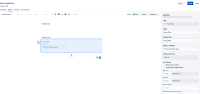
 Here Form field is Form Field and linked Jira custom field is Text CS.
 - Create an issue from Jira agent view. Once the issue is created, Add the form or go to the Added form. We can see the "default" value present in field in the Form. Click on Edit > Submit (without doing any changes in Form).
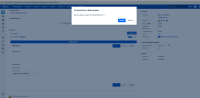
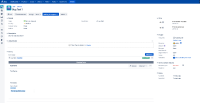
- The Form is submitted, but the linked field in Jira is not updated with the "default" value of the Form field.


Expected Results
The Form containing a field with the "preset/default" value must be updated in the Linked field in Jira.
Actual Results
The Form containing a field with the "preset/default" value is not updated in the Linked field in Jira.
Workaround
- Workaround 1
- Create an Issue > Go to the Form > Edit > Do some changes (add or remove any character or enter the default value again).
- Now you will see Save and Submit option in the Form. Click Save and Submit.
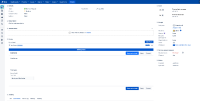
- The Form containing a field with the "preset/default" value is updated in the Linked field in Jira.
- Workaround 2 - Using "Issue Form"
Till we work on a fix for this behaviour, could you please try this workaround and let us know if this would help you temporarily?- Go to Jira Administration > Manage Apps > ProForma > Configuration and Enable Issue Forms (Allow users to select ISSUE FORMS from the top Jira navigation bar). Once this is done, Issue Forms button will be visible on the top Jira navigation bar
- Click on Issue Forms. We will get a pop-up "Create an issue using a form". Select the "Form". We can click on Change to select other Forms.
- Forms will be pre-filled as per Form configuration. Click on Create. This will create a new issue with Form attached. In the newly created issue, we can see the Jira's "linked fields" updated with the pre-filled value from the Forms.


- links to

- mentioned in
-
Page Loading...