-
Type:
Bug
-
Resolution: Unresolved
-
Priority:
 Medium
-
None
-
Affects Version/s: 8.5.0, 7.19.12, 7.19.14, 7.19.16, 7.19.17
-
Component/s: Other
-
14
-
Severity 3 - Minor
-
1
Issue Summary
Log4j is not correctly rotating the atlassian-confluence.log file in the Windows environment since Confluence version 7.19.12.
Steps to Reproduce
- On the Windows server install Confluence 7.19.12 and run Confluence as a Windows service.
- Enable debug for com.atlassian class in Confluence Settings -> Logging and Profiling -> Add com.atlassian in Add New Entry -> Class/Package Name and click on Save at the end of the page. This is to fill the log file quickly to reproduce the issue.
Expected Results
- atlassian-confluence.log file should rotate when it reaches MaxFileSize of 20480KB set in log4j.appender.confluencelog.MaxFileSize=20480KB.
<confluence-install>/confluence/WEB-INF/classes/log4.properties.
Actual Results
- atlassian-confluence.log file will not rotate when it reaches MaxFileSize of 20480KB set in log4j.appender.confluencelog.MaxFileSize=20480KB.
<confluence-install>/confluence/WEB-INF/classes/log4.properties.
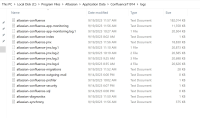

Workaround
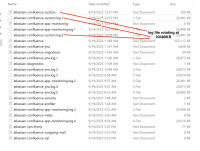
- Rename the atlassian-confluence.log filename to something else, for example, atlassian-confluence-custom.log in <confluence-install>/confluence/WEB-INF/classes/log4.properties file and restart Confluence. Below screenshot showing the log file rotating after the workaround.

OR
- Comment the com.atlassian.analytics.client and burstFilterAppender related lines in log4j.properties file.
- Edit <confluence-install>/confluence/WEB-INF/classes/log4j.properties
- Comment out the com.atlassian.analytics.client and burstFilterAppender related lines (located at the very bottom of the file) by adding a leading # character as such:
# Appender that burst limits log messages
#log4j.appender.burstFilterAppender=com.atlassian.confluence.logging.ConfluenceHomeLogAppender
#log4j.appender.burstFilterAppender.Threshold=ALL
#log4j.appender.burstFilterAppender.layout=com.atlassian.confluence.util.PatternLayoutWithContext
#log4j.appender.burstFilterAppender.layout.ConversionPattern=%d %p [%t] [%c{4}] %M %m%n
#log4j.appender.burstFilterAppender.filter.1=com.atlassian.confluence.impl.logging.filter.BurstFilter
#log4j.appender.burstFilterAppender.filter.1.Level=WARN
#log4j.appender.burstFilterAppender.filter.1.Rate=0.5
#log4j.appender.burstFilterAppender.filter.1.MaxBurst=5

#log4j.logger.com.atlassian.analytics.client.listener.ProductEventListener=WARN, burstFilterAppender
#log4j.additivity.com.atlassian.analytics.client.listener.ProductEventListener=false
- Comment out the com.atlassian.analytics.client and burstFilterAppender related lines (located at the very bottom of the file) by adding a leading # character as such:
- Edit <confluence-install>/confluence/WEB-INF/classes/log4j.properties
-
- Restart the Confluence instance for the change to take effect
If you run Confluence in a cluster, make sure you apply the above changes on all of your nodes (one at a time).


- is related to
-
-

- Closed
-