-
Type:
Bug
-
Resolution: Unresolved
-
Priority:
 Low
Low
-
None
-
Affects Version/s: 6.15.4
-
Component/s: Navigation - Dashboard
-
None
-
2
-
Severity 3 - Minor
Summary
User can customize the default dashboard by going to General Configuration >> Global Templates & Blueprint. However, the column macro is not working when the user adds it into the system template.
Steps to reproduce
- Go to General Configuration >> Global Templates & Blueprint
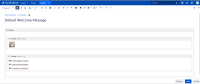
- Edit the Default Welcome Message
- Add a section macro
- Inside the section macro, add 2 column macro with width 50px and 150px
- Save it
- Navigate to the Dashboard.
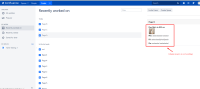

Actual Result

Expected Result

Workaround
Currently, there is no workaround for this bug at the moment.


