-
Type:
Bug
-
Resolution: Fixed
-
Priority:
 Low
Low
-
Affects Version/s: 6.12.2
-
Component/s: Content - Edit Files / Companion
-
2
-
Severity 3 - Minor
Issue Summary
Trying to use the companion app in Confluence to edit a PDF file in Adobe Reader DC does not update Confluence on the first save.
Could reproduce in Windows 10, but not in Mac OS.
Steps to Reproduce
Sample pdf for the steps below: test_pdf.pdf
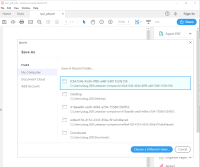
- Preview a PDF on the page and open in Adobe Reader DC using the Companion App (Edit with > Edit with Acrobat Reader)
- Make a change to the pdf (e.g. highlight some text)
- Go to File > Save.
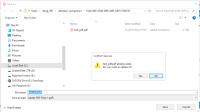
- In the "Save as" prompt, overwrite the file in the correlating companion app folder.


Expected Results
With the new file saved, Confluence will detect the change and activate the "Upload" button to upload the new version of the file.

Actual Results
The change is not detected, the button is inactive, and the updated file cannot be uploaded.

Notes
- Could reproduce in Windows 10, but not in Mac OS.
- Reader opens the "Save as" prompt on all first saves, even for existing files.
Workaround
Two known workarounds:
- Make another edit in Adobe Reader and save. All saves after the initial "Save as" prompt should activate the "Upload" button in Confluence.
- Download the file and upload the new attachment version to the page (not using the companion app, Upload Files)


