-
Type:
Bug
-
Resolution: Duplicate
-
Priority:
 Medium
-
None
-
Affects Version/s: 6.6.1
-
Component/s: Server - Installer / Setup
-
None
-
4
-
Severity 2 - Major
-
0
Summary
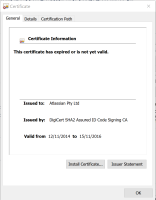
The Confluence Installer fails to run on Windows due to an expired certificate.
Environment
- Windows with Installer Rules enabled in Group Policy through AppLocker or SRP
Steps to Reproduce
- Download and run the Confluence .exe installer
Expected Results
The installer runs as expected
Actual Results
Windows refuses to install the file due to an expired certificate
Notes
- The certificate expired on 15 Nov 2016 as shown below:

Workaround
- Install Confluence manually as described in Installing Confluence on Windows from Zip File
- If you would prefer to use the .exe installer you can disable the security policy that requires a valid certificate


- is superseded by
-
-

- Gathering Impact
-
- relates to
-
XPLN-523 Loading...