-
Type:
Bug
-
Resolution: Unresolved
-
Priority:
 Low
Low
-
Component/s: Permissions - Content - Share
-
None
-
2
-
Minor
Issue Summary
- In any Confluence page, we can click on the "Share" button near the top right, to share a page with users who are in, or not in the site.
- If we use their email for this, even if the user is already in, we get a message that prompts us to invite the user into the site.
Steps to Reproduce
- Visit any page in Confluence.
- Click on the "Share" button.
- Type in the email of any user we want to share the page with;
- Making sure that the user already has access to the site/space/page.
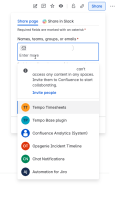
- You'll get a message that says;

user@email.com can't access any content in any spaces.
Invite them to Confluence to start collaborating.
Invite people

Expected Results
- The "Invite people" pop-up should only appear if the user/email is not already in the site.
Actual Results
- The "Invite people" pop-up appears regardless if the user is in the site or not,.
Workaround
- As a workaround, we can either;
- Search for the user using their name, and selecting their profile, or
- Click anywhere outside the "Share" pop-up to dismiss the message, and click on the "Share" button again to share the page.

- duplicates
-
CONFCLOUD-74387 Confluence User Mention / Space Permission search by email
- Closed
- is duplicated by
-
- Closed
- mentioned in
-
Page Loading...