-
Type:
Bug
-
Resolution: Fixed
-
Priority:
 Low
Low
-
Component/s: Page - Export - PDF
-
None
-
4
-
Severity 3 - Minor
-
1
Issue Summary
- Export to PDF on a page with the Page Properties macro shows a gradient shading
Steps to Reproduce
- Add the Page Properties macro to a Confluence page
- Add a table to the macro and fill in the rows and columns
- Publish the page

- Export the page as PDF using the Export to PDF menu item

Expected Results
- The exported page shows the table with no shading gradient.
Actual Results
- The exported page shows the table with a shading gradient. See screenshot below:
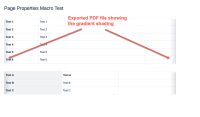
- This issue cannot be reproduced on every site or every page. You may need to try on different sites to get this shading gradient to show.

Workaround
- Currently there is no known workaround for this behavior. A workaround will be added here when available


- is related to
-
-

- Closed
-