-
Type:
Bug
-
Resolution: Fixed
-
Priority:
 High
High
-
Component/s: Macros - Task Report
-
None
-
6
-
Severity 3 - Minor
Issue Summary
Unable to remove the default space name from the task report macro, and due to that task report macro shows task from other pages as well, so we can not show tasks from a specific page(current page)

Steps to Reproduce
- Step 1 Create a page 2 page and and insert few tasks
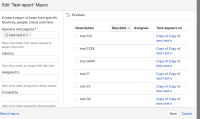
- Step 2 create another page insert task report macro, select current page in task report macro.

Expected Results
We should be able to remove default space from the Space(s) and page(s)

Actual Results
If we remove default space(current space) name from Space(s) and page(s) and save the macro and edit gain it again shows the default space in Space(s) and page(s) field.
And it shows all the tasks from the whole space or from the original page if we create a copy from the original page.

Workaround
Currently there is no known workaround for this behavior. A workaround will be added here when available


- relates to
-
-
- Closed
-