Export to PDF/Word does not render Emojis

XMLWordPrintable

    • 14
    • Severity 3 - Minor
    • 3

      Summary

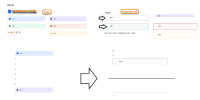
      Export to PDF does not render Emojis and Icons in information panels and Text in information panels has different sizes

      Steps to Reproduce

      1. Create a page or a blog
      2. Add several emojis on the page
      3. Export the page to PDF

      Expected Results

      • Emojis should be rendered in the exported PDF file.
      • Text in information panels should have the same size.

      Actual Results

      • Emojis are not intermittently not rendered in the exported PDF file.
      Notes

      • Also reproduced with Word files.

        1. Exported File.png
          Exported File.png
          10 kB
        2. Page Content.png
          Page Content.png
          12 kB
        3. screenshot-1.png
          screenshot-1.png
          222 kB
        4. Screen Shot 2020-06-26 at 2.47.52 PM.png
          Screen Shot 2020-06-26 at 2.47.52 PM.png
          88 kB

            Assignee:
            Unassigned
            Reporter:
            Janice Alor (Inactive)
            Votes:
            96 Vote for this issue
            Watchers:
            86 Start watching this issue

              Created:
              Updated:
              Resolved: