-
Type:
Bug
-
Resolution: Fixed
-
Priority:
 Highest
-
Component/s: Macros - Attachments
-
88
-
Severity 3 - Minor
-
24
Summary
- When using the Browse for files option in the Attachments macro, the file won't be uploaded.
Steps to Reproduce
- Add the Attachments macro to a page;
- On the Attachments macro of the published page, click on Browse for files;
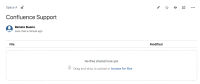
- Select the file you wish to upload and confirm;

Expected Results
- The file will be uploaded correctly on the macro;
Actual Results
- The page acts like it uploaded the attachment but, when it refreshes, there is no attachment in there.
Workaround
- Use the drag & drop option of the Attachments macro (Depending on the case, it might not work)
Please also check the related issue and fix as part of looking into this issue.


- is related to
-
-

- Closed
-
-
CONFCLOUD-62326 Attach file using drag and drop on the attachment box do not show progress bar
- Closed