-
Type:
Bug
-
Resolution: Fixed
-
Priority:
 Medium
-
Component/s: Page - Content, Page - Export - PDF
-
None
-
22
-
Severity 3 - Minor
-
1
Summary
When Single Column Page Layout has been applied to a page, exporting the page to PDF cuts off the left-hand side of the page.
Environment
- Confluence Cloud
Steps to Reproduce
- Create a new Confluence page.
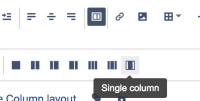
- Select Page Layout and Single Column Layout:
- Add your text into the layout cell.
- Publish the page.
- Click . . . > Export to PDF

Expected Results
- The PDF file generated is normal and all text is legible.
Actual Results
- The PDF file generated is truncated on the left.


Workaround
- Use another page layout instead, such as Full Width, or two or 3 columns.
- Another option is to instead insert a single table cell, center this on the page, and set to Fixed Width rather than Responsive. This will have a similar appearance. The downside of this is if there is already a table that should go into this layout, it won't work since nested tables are currently unsupported in Cloud:
CONFCLOUD-58656


