-
Type:
Bug
-
Resolution: Fixed
-
Priority:
 Low
Low
-
Affects Version/s: 8.9.0
-
Component/s: AppLinks, Integration - JIRA
-
1
-
Severity 3 - Minor
-
2
Issue Summary
This is reproducible on Data Center: yes
Steps to Reproduce
- Create an Application link to Jira Instance with different "Application" and 'Display URLs'
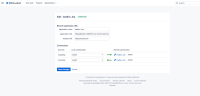
- Block the 'Application URL' access on the client system (browser) using /etc/hosts.
- Create issues in Jira and assign it to yourself.
- Check the "Your Jira Issues" section on the linked Bitbucket dashboard.

Expected Results
- All Jira issues related data on the user dashboard UI should be retrieved using the Jira "Display URL".
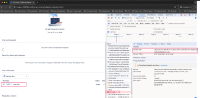
Actual Results
- Some static images are being retrieved using the internal "Application URL" causing them to break.

Workaround
- Currently there is no known workaround for this behavior. A workaround will be added here when available

