-
Type:
Bug
-
Resolution: Unresolved
-
Priority:
 Low
Low
-
None
-
Affects Version/s: None
-
Component/s: None
-
Severity 3 - Minor
Summary
If you have only System Git + Git LFS and upgrade to SourceTree 1.9.9.20, SourceTree will prompt you to install the Embedded version of Git and Git LFS. If you don't do so, SourceTree cannot work with the system version of LFS.
Environment 1
SourceTree 1.9.9.20, System Git 2.10.2, Git LFS 1.5.2
Environment 2
SourceTree 1.9.9.20, System Git 2.11, Git LFS 1.5.2
Steps to Reproduce
- Install Git 2.10.2, Git LFS 1.5.2 in your machine
- Install SourceTree
- Open SourceTree and add a local repository with git lfs
- SourceTree will prompt you to download embedded git lfs:
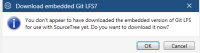
- Click Cancel

Expected Results
SourceTree continues to work with System Git + Git lfs
Actual Results
SourceTree shows this message: 
Any operations on lfs files throw errors
Additionally, in SourceTree Options >> tab Git, the version of Git LFS is not displayed at all: 
Workaround
Install Embedded Git and Embedded Git LFS
Then, SourceTree will be able to work well with System versions as well
Notes
The workaround may not work for users who are behind a proxy which blocks the download of Embedded Git+Git LFS.
In that case, the user may downgrade to an earlier version.


