-
Type:
Bug
-
Resolution: Fixed
-
Priority:
 Highest
-
Affects Version/s: JCMA - 1.10.9, JCMA - 1.10.10, JCMA - 1.10.11, JCMA - 1.10.16, JCMA - 1.10.18
-
None
-
194
-
Severity 3 - Minor
-
6,694
Issue Summary
JCMA is not migrating all Filters with the latest v1.10.9 version.
Selecting all "Cross-project boards and filters" doesn't help.
Dark Feature com.atlassian.jira.migration.export.all.filters doesn't help either.
Steps to Reproduce
1. With "Choose what to migrate" option select all Projects for migration and all "Cross-project boards and filters"
OR
1. With "Choose what to migrate" option select all Projects for migration and all "Cross-project boards and filters"
2. Create a dummy project and migrate it with com.atlassian.jira.migration.export.all.filters DF enabled
Expected Results
All Filters are getting migrated to Cloud (single-project and cross-project filters)
Actual Results
Only some part of the Filters is getting migrated.
Even single-project filters are not getting migrated.
No errors related to Filters migration found in application logs.
Workaround
- Enable the dark feature flag: com.atlassian.jira.migration.export.all.filters
- Make sure you click Edit in "Cross-project boards and filters" selection and choose "All cross-project filters and boards" as shown on the picture
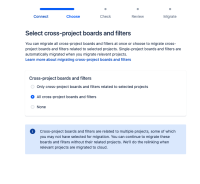
- It should then re-evaluate the number of filters and boards to be migrated
- Perform a migration and check the number of actually migrated filters and boards



If that doesn't work, proceed with the following workaround:
- Downgrade JCMA to version 1.9.17
- Enable the two Dark Features, as mentioned in the following KB article:
- Migrate a single newly created dummy project with JCMA


- relates to
-
-

- Closed
-
-
MOVE-1746476 Loading...
- is blocked by
-
-
-
-
- mentioned in
-
-
-
-
-
-
-
-
-
-
-
-
-
-
-
-
-
-
-
-