-
Type:
Bug
-
Resolution: Fixed
-
Priority:
 High
High
-
Affects Version/s: JCMA - 1.9.14, JCMA - 1.10.0
-
13
-
Minor
-
43
Issue Summary
JCMA is unable to migrate the screens assigned to transitions when using the default configuration of the classic default workflow.
While the classic default workflow exists on both Cloud and on-prem, migrating a workflow based on it with JCMA might break screen association.
Steps to Reproduce
- Create a Jira Software Project on a Jira Server instance
- Go to the project's settings area -> Workflows -> Add workflow -> Add existing
- Choose the classic default workflow to add to the project and associate it with an Issue Type
- Publish the workflow (after doing the statuses association)
- Confirm that you can see the project workflow's transition Reopened display an association with the screen Workflow Screen via the classic default workflow association
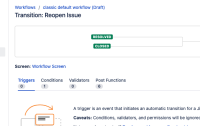
- On Server, going to the transition in the workflow, you can confirm the association (in the UI) between the screen and the transition:

- Test the transition by closing and reopening one Jira Issue and confirm the screen will pop up
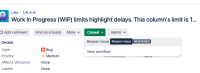
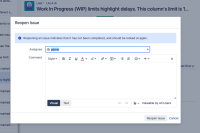
- Migrate this project with JCMA


Expected Results
- The same behavior on the Cloud - to see the Workflow Screen associated with the Reopened transition
Actual Results
- The Workflow Screen is not migrated with the project data via JCMA - so the association between the screen and the transition is lost

Workaround
- Post-migration, recreate the association between the screen and the transition manually.


