-
Type:
Suggestion
-
Resolution: Unresolved
-
66
Issue Summary
JCMA does not migrate many of the legacy automation rules. What is stated in What gets migrated with the Jira Cloud Migration Assistant can be misleading because it gives the impression that all legacy automation is migrated
Steps to Reproduce
- Create a legacy automation rule in server.
- Migrate to Cloud via JCMA

Expected Results
Per https://support.atlassian.com/migration/docs/what-gets-migrated-with-the-jira-cloud-migration-assistant/, it is stated that "Legacy automation rules" is included in "what is migrated".
Actual Results
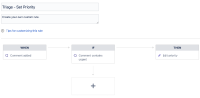
Not all legacy automation rules can be migrated, even if there are no 3rd party app functionality involved. For example, a rule to update issue field on comment cannot be migrated. (refer to screenshot in "steps to reproduce").
The below exception is thrown in the atlassian-jira.log file on server:
2023-03-02 05:08:35,178+0000 pool-40-thread-2 INFO [c.a.j.m.e.s.automation.filters.NotImplementedFilter] Skip Export - Automation rule with ID 26. Reason - module key com.atlassian.servicedesk.plugins.automation.servicedesk-automation-modules-plugin:edit-issue-action export not implemented.
Workaround
Manually recreate the rule in Cloud.
