-
Type:
Bug
-
Resolution: Cannot Reproduce
-
Priority:
 Low
Low
-
Component/s: List - Work Item Create
-
1
-
Severity 3 - Minor
Issue Summary
Epic icon is not displayed when creating Epic on Jira Work management(company managed project) List view.
Steps to Reproduce
- go to https://id.atlassian.com/manage-profile/account-preferences
- change profile language to Multibyte(ex. Japanese)
- create Jira work management compamy-managed project
- add "Epic" on issue types
- got to Jira Work management "List view"
- create issue by clicking + button
- Epic icon dose not appears.
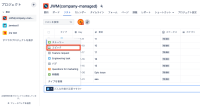
- and, after create "Epic" issue, Epic icon appear in JWM list view.

Expected Results
Epic icon appear
Actual Results
Epic icon dose not loaded.
Workaround
go to https://id.atlassian.com/manage-profile/account-preferences and change profile language to English.


