Enable Issue Type icons on cards of Business boards

XMLWordPrintable

    • Type: Suggestion
    • Resolution: Fixed
    • Component/s: Board - View
    • None
    • 0
    • 5

      Problem Definition

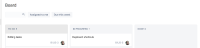
      The Issue types do not appear on cards for Business boards, therefore you cannot identify the type of the issue unless you click on it.

      Suggested Solution

      Similarly to Jira Software boards, enable the customer an option to display the issue type on the cards on Business projects.

      • Business project board - you cannot identify the issue type:
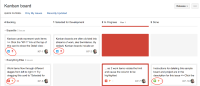
      • Software (Kanban) board:

      Why this is important

      This will help to identify the issue type just by looking at them like it's done on Kanban or Scrum boards.

      Workaround

      None.

        1. core-board.png
          core-board.png
          75 kB
        2. jsw-board.png
          jsw-board.png
          237 kB
        3. screenshot-1.png
          screenshot-1.png
          206 kB
        4. screenshot-2.png
          screenshot-2.png
          269 kB

            Assignee:
            Unassigned
            Reporter:
            Luiz Farias (Inactive)
            Votes:
            47 Vote for this issue
            Watchers:
            19 Start watching this issue

              Created:
              Updated:
              Resolved: