-
Type:
Bug
-
Resolution: Unresolved
-
Priority:
 Low
Low
-
None
-
Affects Version/s: 9.4.18, 9.8.1, 9.12.7, 9.15.1
-
Component/s: Epics
-
None
-
9.04
-
2
-
Severity 3 - Minor
-
1
Issue Summary
This is reproducible on Data Center: (yes)
Steps to Reproduce
- Create a Scrum board.
- Create a new Epic.
- Drag the story to the Epic panel to link the issue.
- Navigate to "Active Sprints" and open the issue detail view.
- We can see the Epic color is matching.

- Go back to Backlog.
- Change the Epic color to Green and the color is matching in the Backlog view.
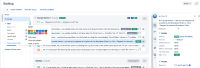
- Navigate back to "Active Sprints" view and Epic color did not match.



Expected Results
The Epic color in Active Sprint should be matching the actual Epic color changes in the backlog.
Actual Results
The Epic color in Active Sprints is not reflecting the actual Epic color in the backlog.
Workaround
Refresh the browser page.


