-
Type:
Bug
-
Resolution: Unresolved
-
Priority:
 Low
Low
-
None
-
Affects Version/s: 8.20.2, 8.22.0, 9.4.0
-
Component/s: (Advanced Roadmaps) Plan - Roadmap
-
8.2
-
8
-
Severity 3 - Minor
-
1
Issue Summary
HTML content of list options is not rendered at Advanced Roadmaps Plan page for list custom fields (Select List Single/Multiple choices)
Steps to Reproduce
- Go to Administration > System > General configuration and toggle the HTML flag for custom field description to ON.
- Navigate to Administration > Manage Add-ons, filter the visible add-ons by System Add-ons and search for "wiki", to find the Wiki Renderer Macros Plugin. Make sure it is enabled.
- Create "Select List (single choice)" or "Select List (multiple choices)" custom field(-s).
- Add list options with HTML content. For example:
<span style="color:Red;font-size:11px;font-weight:bold;">Red</span>
<span style="color:Green;font-size:11px;font-weight:bold;">Green</span>
- Add created custom field(-s) to appropriate Screen(-s) in your configuration.
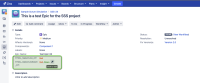
- Update any issue and set values for created custom fields. Note that HTML content of custom fields is rendered correctly:
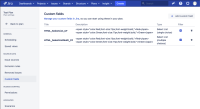
- Adjust configuration of Advanced Roadmaps Plan to add created custom field(-s) — Settings (⚙) > Configure > Custom fields
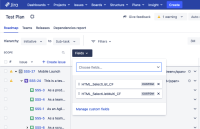
- Add created fields to the Plan view:
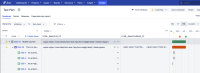
- Review Plan outlook — HTML content of custom fields is not rendered:


Expected Results
HTML content of list options should be rendered at Plan page since it is properly rendered at the issue View screen
Actual Results
HTML content of list options is not rendered on the Advanced Roadmaps Plan page
Workaround
Currently, there is no known workaround for this behaviour. A workaround will be added here when available
Note
Note that this issue impacts any other type of custom fields: HTML rendering is not supported in Plans for any custom field.


- links to

- mentioned in
-
Page Loading...