-
Type:
Suggestion
-
Resolution: Unresolved
-
None
-
Component/s: Data Center
-
0
-
1
Issue Summary :
When 500 error is thrown it is displayed on the UI with via error page. This page lets you toggle through the error stack trace that was propagated. This stack seems to carry library information on every line.
Steps to Reproduce
- Login to Jira
- Hit JIRA_BASE_URL/browser
- You should see screen as below with error code 500 and stack below:
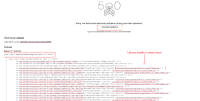

Expected Results
There should be a way to disable plugin information on stack trace.
Actual Results
Sample exception trace:
java.lang.IllegalArgumentException: path is invalid
	at com.atlassian.jira.projects.web.filter.BrowseProjectUrlHelper.<init>(BrowseProjectUrlHelper.java:60) [?:?]
	at com.atlassian.jira.projects.web.filter.BrowseProjectRedirectFilter.doFilter(BrowseProjectRedirectFilter.java:58) [?:?]
	at com.atlassian.core.filters.AbstractHttpFilter.doFilter(AbstractHttpFilter.java:32) [atlassian-core-7.0.2.jar:?]
	at com.atlassian.plugin.servlet.filter.DelegatingPluginFilter.doFilter(DelegatingPluginFilter.java:62) [atlassian-plugins-servlet-5.2.3-96cf760eb.jar:?]
	at com.atlassian.plugin.servlet.filter.IteratingFilterChain.doFilter(IteratingFilterChain.java:37) [atlassian-plugins-servlet-5.2.3-96cf760eb.jar:?]
	at com.atlassian.plugin.servlet.filter.DelegatingPluginFilter.lambda$doFilter$0(DelegatingPluginFilter.java:57) [atlassian-plugins-servlet-5.2.3-96cf760eb.jar:?]
Workaround
Within the logs if same exception is thrown, library information can be suppressed by modifying the respective conversion pattern from:
ConversionPattern=%d{yyyy-MM-dd HH:mm:ss,SSSZ} %t %p %X{jira.username} %X{jira.request.id} %X{jira.request.assession.id} %X{jira.request.ipaddr} %X{jira.request.url} [%q{2}] %m%n
to
ConversionPattern=%d{yyyy-MM-dd HH:mm:ss,SSSZ} %t %p %X{jira.username} %X{jira.request.id} %X{jira.request.assession.id} %X{jira.request.ipaddr} %X{jira.request.url} [%q{2}]
