-
Type:
Bug
-
Resolution: Not a bug
-
Priority:
 Medium
-
None
-
Affects Version/s: Unknown
-
Component/s: Development Panel
-
Severity 3 - Minor
Problem
If JIRA/Stash with SSL connections are using an invalid hostname in the SSL certificate, workflow triggers will not work. Other functions of the application link integration appears to be working as expected.
Summary
- Configure JIRA and Stash with SSL in Tomcat(using SSL certificate with an invalid hostname)
Sample Connector from server.xml file used for both JIRA and Stash with the only difference being listening ports:
	<Connector port="8443" protocol="org.apache.coyote.http11.Http11Protocol"
              maxHttpHeaderSize="8192" SSLEnabled="true"
              maxThreads="150" minSpareThreads="25"
              enableLookups="false" disableUploadTimeout="true"
              acceptCount="100" scheme="https" secure="true"
              clientAuth="false" sslProtocol="TLS" useBodyEncodingForURI="true"
              keyAlias="jira639" keystoreFile="<jira-home>jira.jks" keystorePass="changeit" keystoreType="JKS"/>
 Tests via Applinks Diagnostics plugin all come back successful.
- Go to workflow in JIRA and when adding a workflow trigger you'll see a message telling you 'JIRA is not able to communicate with Stash':
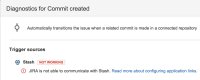

It is possible to still add the trigger, however tests reveal that it does not work as message in the diagnostic above indicates.
Verifiy
- Please see Development Panel missing and Workflow triggers not working to confirm whether you are using a valid SSL certificate.


- is related to
-
-

- Closed
-
- derives
-
FUSE-2091 Loading...
- is caused by
-
- mentioned in
-
-
-
-
-
-
- relates to
-