-
Type:
Bug
-
Resolution: Unresolved
-
Priority:
 Low
Low
-
None
-
Affects Version/s: 6.4.12, 7.1.6
-
Component/s: Scrum Board
-
6.04
-
6
-
Severity 3 - Minor
-
0
Summary
If the board filter contains project = <projectKey>, the sidebar of this board will contains some links associated to the project, for example Releases, Issues, Project shortcuts and Project administration. If the board filter does not contains project = <projectKey> explicitly, the sidebar will not contains any links for Releases, Issues, Project shortcuts and Project administration.
Steps to Reproduce
- Create a Scrum/Kanban board with sample data.
- View board's configuration, the filter query should be like project = SSP ORDER BY Rank ASC.
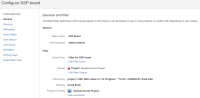
- Create a new filter with only issues in To Do and In Progress status from the result returns from the board filter, for example filter = "Filter for SSP board" AND status in ("To Do", "In progress").
- Create another board with the new filter from step 3, the configuration of the board should be similar with the configuration in this screenshot.

- Go back to view the board.


Expected Results
The sidebar for the board created in step 4 should be the same as the one in step 1. 
Actual Results
In JIRA 7.1.x, there are no project specific links in the sidebar for board created in step 4. 
In JIRA 6.4.x, there is no sidebar at all.
Workaround
Add AND project = SSP at the end of the board filter in step 4


- is related to
-
JSWSERVER-14982 Board using jql query across projects also need to have shortcuts and board links
- Gathering Interest