-
Type:
Bug
-
Resolution: Not a bug
-
Priority:
 Medium
-
None
-
Affects Version/s: 8.2.2
-
Component/s: AgileBoard, Sprint
-
8.02
-
1
NOTE: This bug report is for JIRA Software Server. Using JIRA Software Cloud? See the corresponding bug report.
Summary
Despite setting the date/time format in Administration > System > Look and feel, Sprints will still show the default date/time format. Re-indexing and changing the language does not make any changes.
Steps to reproduce:
- Go to Administration > System > Look and feel
- Change the date/time format:
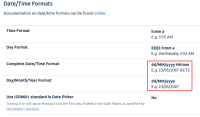
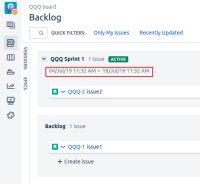
- Go to any existing active Sprint. The date/time would be displayed using the default format:


Expected Results
Date/time format would follow the configurations set in Administration > System > Look and feel
Actual Results
The configurations are not followed and date/time format still shown as default.
Workaround
None.


- is duplicated by
-
-

- Closed
-
- is related to
-
-

- Closed
-
- relates to
-
-
- Closed
-