-
Type:
Bug
-
Resolution: Fixed
-
Priority:
 Medium
-
Affects Version/s: 6.6.0
-
Component/s: None
-
6.06
Steps to reproduce the problem:
- Configure the Board to use Remaining Estimate and Time Spent estimation.
- Go to Plan mode and add a new sprint.
- Add two issues such as DEMO-4 and DEMO-5:
- DEMO-4 contain no sub-task.
- DEMO-5 got one sub-task.
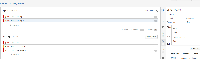
- Assign 12m to Remaining Estimate for DEMO-5 by clicking the down arrow:
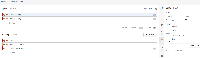
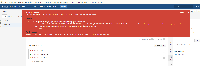
- Next, assign 20m to Remaining Estimate for DEMO-4, then bump into the Javascripts error because the pop up box doesn't closed and the value still refer back to DEMO-5:


Expected Behavior:
After assign Remaining Estimate value to the issue that contain sub-task, the next issue should not show the pop up box again.


- relates to
-
-
- Closed
-
- was cloned as
-
SW-886 Loading...