-
Type:
Bug
-
Resolution: Fixed
-
Priority:
 High
High
-
Component/s: Board (UIF)
-
4
-
Severity 2 - Major
-
8
Issue Summary
Selecting Remove from sprint via right-click on issue card does not remove issue from sprint in Enhanced board.
If you select Remove from sprint via right-click on an issue card and either refresh OR go to a different page before waiting 8 seconds, the issue will not actually be removed from the sprint. The only way to speed up this process is to manually close the pop-up notification:

Steps to Reproduce
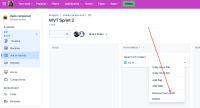
- On an Enhanced board of an active sprint, right-click on an issue and select "Remove from sprint":
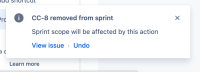
- Observe that the card disappears from the board and a pop-up appears:
CC-8 removed from sprint
Sprint scope will be affected by this action
View issue * Undo
- Refresh the page. Observe that the card has reappeared.

Expected Results
Selecting Remove from sprint via right-click on issue card should remove issue from Sprint.
Actual Results
Selecting Remove from sprint via right-click on issue card does not remove issue from sprint in Enhanced board.
Workaround
Go to backlog and drag and drop the issue to the backlog.


- is related to
-
JRACLOUD-92670 Enable warning message in new issueview "Sprint scope will be affected by this action"
- Closed
- relates to
-
-

- Closed
-
- is addressed by
-
FEBO-8948 Loading...
- mentioned in
-