-
Type:
Bug
-
Resolution: Fixed
-
Priority:
 Low
Low
-
Component/s: Classic - Boards
-
2
-
Severity 1 - Critical
Summary
A Javascript error is thrown when the 'Where is my field?' option is clicked.
Steps to Reproduce:
- Navigate to a Kanban/Scrum board
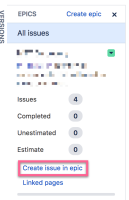
- From the Epic Panel, open any epic and select the option 'Create issue in epic'
- Click the Configure Fields, and select 'Where is my field?' option

Expected Results
'Where is my field?' screen shows up

Actual Results
The following Javascript error is thrown in the dev tools and customers see a spinning wheel on screen forever

Exception: Uncaught Uknown current dialog ID: create-epic-issue-dialog


- is cloned from
-
-

- Closed
-