-
Type:
Bug
-
Resolution: Timed out
-
Priority:
 Low
Low
-
Component/s: Knowledge Base & Confluence integration
-
1
-
Severity 3 - Minor
Summary
- Loading page in iframe works in Confluence, but the iframe height seems to be always 40px when viewing Knowledge Base(KB) article
- When accessing the Confluence page using the Jira Service Desk(JSD) portal, pages within the iframe are narrow and are not readable:
View from portal
(e.g. https://<instance>.atlassian.net/servicedesk/customer/kb/view/<article_id>)View from Confluence 
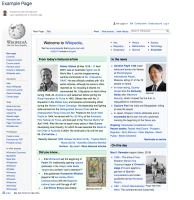
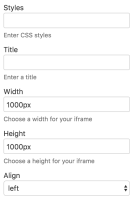
- Changing the iframe macro settings in Confluence has no effect on the iframe height when loading the corresponding KB article:


Environment
- Jira Service Desk Cloud
- Confluence Cloud
- Knowledge Base feature enabled in Jira Service Desk
Steps to Reproduce
- Ensure that the Knowledge Base in JSD is configured as per Set up a Knowledge Base
- Create the Confluence page which contains an iframe macro
- Configure the iframe macro as required
- Load the corresponding Knowledge Base article within the portal
Expected Results
- The iframe dimensions are correct as per the settings on the iframe macro in Confluence
Actual Results
- The iframe when viewing KB article is too narrow and the page is not easily readable
Notes
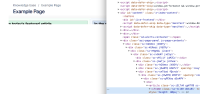
- When inspecting the iframe, the height always seems to be 40px despite the setting in the iframe macro in Confluence specifying that the value should be different:
- The "width" setting in the iframe macro settings seems to change the iframe width, but "height" doesn't seem to do anything

Workaround
- In Confluence, click on the iframe and click "Edit"
- Set "Align" to the blank option at the top of the list.
- Save/Publish the Confluence article.
Overall it should look like this once done:


