-
Type:
Bug
-
Resolution: Unresolved
-
Priority:
 Low
Low
-
None
-
Affects Version/s: 11.3.7, 10.3.16, 10.3.22
-
Component/s: Issue - Attachments
-
None
-
10.03
-
1
-
Severity 3 - Minor
Issue Summary
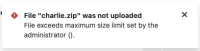
When users try to upload an attachment that's too large, the error message does not display the actual size limit set by the administrator. Instead, the error message shows the limit as empty or blank.
File "charlie.zip" was not uploaded
File exceeds maximum size limit set by the administrator ().
Steps to Reproduce
- Login to Jira
- Try to upload attachment which exceeds the configured limit (⚙ > System > Attachments > Attachment size)
- An error message will be displayed, as expected but it lacks information around allowed limit
- File exceeds maximum size limit set by the administrator ()
Expected Results
The error message displayed should be informative with details of allowed size limit. For e.g.
- File exceeds maximum size limit set by the administrator (10.00 MB)


Actual Results
The error message shows the limit as empty or blank
- File exceeds maximum size limit set by the administrator ()

Workaround
Currently there is no known workaround for this behavior. A workaround will be added here when available

