-
Type:
Bug
-
Resolution: Unresolved
-
Priority:
 Low
Low
-
None
-
Affects Version/s: 11.3.3, 10.3.21
-
Component/s: Rich Text Editor
-
None
-
10.03
-
1
-
Severity 3 - Minor
Issue Summary
Jira Rich Text Gadget doesn't show the correct code format
Steps to Reproduce
- Create a Rich Text Gadget in the Dashboard
- Input the codes below in the Rich Text gadget
{code:xml} <test> <another tag="attribute"/> </test> {code} {code:java} // Some comments here public String getFoo() { return foo; } {code} {code:json} { "id": 1, "name": test user, "email": testuser@local.com, "location" { "country": Indian } } {code} {code:sql} select * from jiraissues {code} {code} ps -eaf|grep java {code} - Click the Visual button, the code format is all good
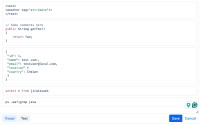
- Click the Save button

Expected Results
All codes should be displayed in the correct format, as in the Visual view.
Actual Results
The XML and JSON codes are not correctly displayed

Workaround
Currently, there is no known workaround for this behaviour. A workaround will be added here when available

