-
Type:
Bug
-
Resolution: Unresolved
-
Priority:
 Low
Low
-
None
-
Affects Version/s: 9.12.25, 10.3.8, 10.7.1
-
Component/s: Issue - Fields
-
9.12
-
2
-
Severity 3 - Minor
-
0
Issue Summary
The system field Security Level loses its default selection when the issue is created from Create linked issue in another project, which is not using the same security scheme
Steps to Reproduce
- Create 2 projects, for example, A1 and B2.
- Create an issue security scheme and associate it with Project A1, and set this scheme to be the default scheme in A1.
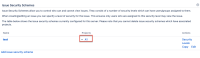
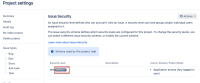
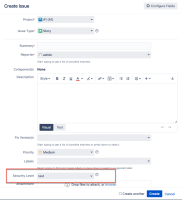
- In Project A1's permission, grant the current user the permission to Set Issue Security, so that the system field Security Level appears in the Create Issue screen and has a default value:
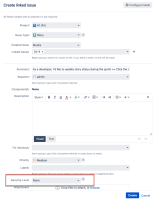
- In Project B2's any issue's page, click on More > Create linked issue and select Project A1. The system field Security Level shows None:


Expected Results
The system field Security Level should show the default value.
Actual Results
The system field Security Level shows None.
Notes
The problem is not reproducible if both projects use the same issue security scheme.
Workaround
If using the same issue security scheme for the other project is not feasible, users will have to rely on manually selecting the issue security level as a workaround until the problem is fixed.
Versions Tested
Please confirm all versions that have been tested for this issue, and indicate whether the tested version is affected or not affected, below:
| Testing Requirements | Version | Affected Version |
|---|---|---|
| Customers Reported Version | 9.12.5 | Yes |
| Most Recent Bug-Fix Release | 10.7.1 | Yes |
| Previous Major Release | ||
| Most Recent LTS | 10.3.8 | Yes |
| Previous Supported LTS | 9.12.25 | Yes |
| Other Versions.. | ||
| (Add rows as needed) |


