-
Type:
Bug
-
Resolution: Unresolved
-
Priority:
 Low
Low
-
None
-
Affects Version/s: 10.3.1
-
Component/s: System Administration - Look and Feel
-
10.03
-
4
-
Severity 3 - Minor
-
1
Issue Summary
The text formatting for code blocks is not rendering properly in Dark Theme.
It works as expected in Original/Light Theme.
Steps to Reproduce
- Using the formatting provided in this article;
{code:xml} <test> <another tag="attribute"/> </test> - Open a Jira issue and type the code block on the Description or Comment field;

Expected Results
The code block should be rendered properly like this (this is from Light Theme);

Actual Results
In Dark Theme, the code block shows like this;

Workaround
A workaround is to add custom CSS rule through the announcement banner;
- Configure announcement banner with the following custom CSS rule;
<style>
.code-tag {
   color: var(--ds-text-accent-teal, #000091);
}
</style>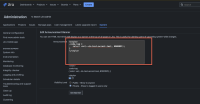
- Add the code block in either Description/Comment field;
{code:xml}
    <test>
        <another tag="attribute"/>
    </test>
{code}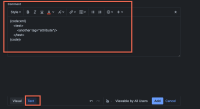
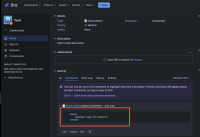
- The result would be like this;


- is related to
-
-
- Long Term Backlog
-
- mentioned in
-
Page Loading...