-
Type:
Bug
-
Resolution: Unresolved
-
Priority:
 Low
Low
-
None
-
Affects Version/s: 9.4.21, 9.12.16, 10.3.1
-
Component/s: Navigation - Search
-
9.04
-
1
-
Severity 3 - Minor
Issue Summary
Epic link values are not displayed in the Jira search page after switching from Advanced to Basic search
This is reproducible on Data Center: (yes)
Steps to Reproduce
- Unlocked the Epic Links field
- Rename the field Epic Links to Epic-Verknüpfung and save the changes.
- Create a new Epic issue and link to a random Story issue.
- Navigate to the Jira issue search and add this JQL query and save as a new filter:
project = SCRUM AND Epic-Verknüpfung = SCRUM-24
-
- SCRUM-24 is an example of the Epic issue key. Please put any issue that match your instance.
- Click Basic View and the Epic Links value is missing.
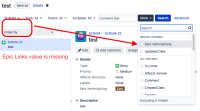
- Switch back to Advanced view and we can see the Epic Links field value is there.


Expected Results
The Epic Link field value should be there after switching to Basic View.

Actual Results
The Epic Link field value is missing after switching to Basic View.

Workaround
Rename the Epic Links field name back to the original name.


- mentioned in
-
Page Loading...